
See your story, not just your code
BranchPy Studio maps every label, jump, call, and menu branch in your project and renders it as a live, interactive flowchart — a clear visual map of paths, branches, and relationships you can pan, zoom, and explore.
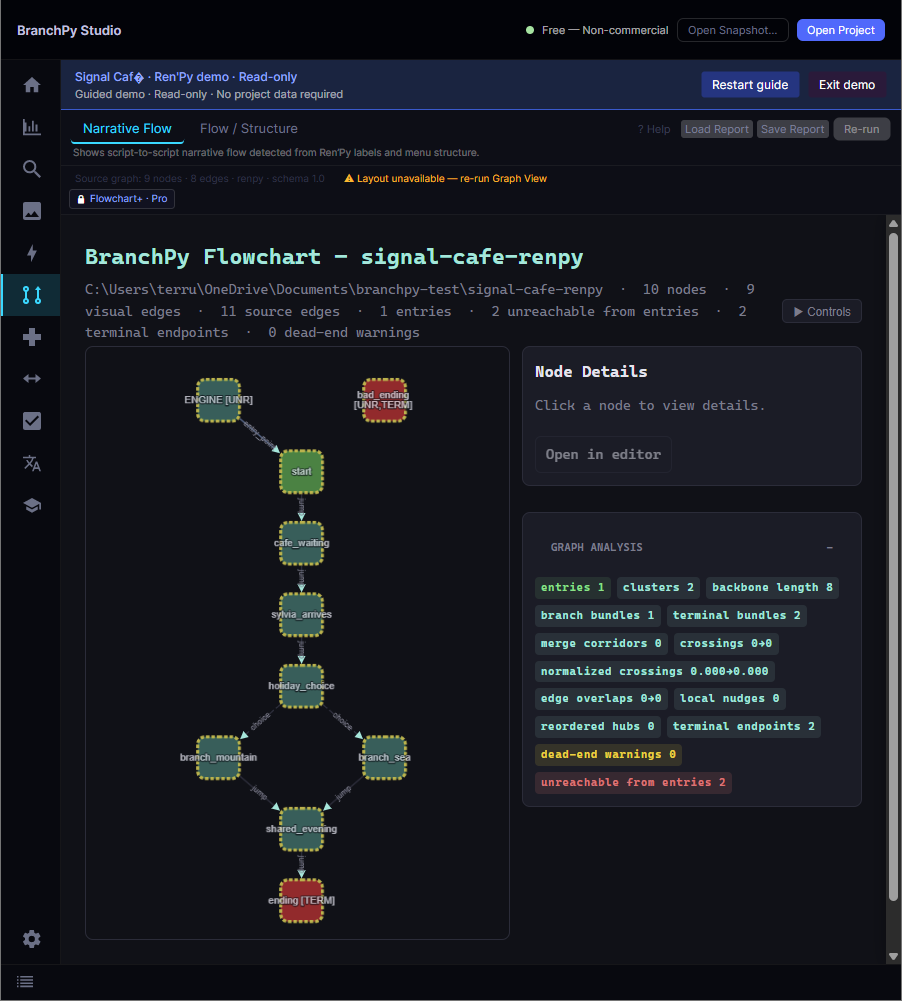
The Flowchart screen in BranchPy Studio — every label is a node, every jump and branch an edge.
Ren'Py scripts don't tell you where they go
A production project can have hundreds of labels spread across dozens of .rpy files. jump chapter3_intro is just a string — without a tool that resolves every jump, call, and menu branch, you're navigating your own story blind.
BranchPy Studio maps every label and branch in your scripts and renders the result as a pannable, zoomable flowchart. Clicking any node opens the source at that exact label, so understanding the shape of your story takes seconds — not a mental model you have to rebuild every session.
What it maps
Full project graph
Every label becomes a node and every jump, call, or menu branch a directed edge — the entire project resolved into one connected map.
Click-to-source
Select any node to open its source file at the exact label. Navigate a large project by its structure instead of by filename.
Node typing by role
Nodes are coloured by what they do — entry, narrative, routing, system, exit — so the role of each block is readable at a glance.
Group & collapse labels
Collapse related labels into named groups to tame a large graph, then expand only the section you're working on.
Pan, zoom & search
Move freely across the canvas, zoom from full overview to a single branch, and find any label by name.
Branch & edge clarity
Edge styling distinguishes certain transitions from conditional ones, so forks, merges, and dead ends stand out.
From script to map in three steps
No external tools, no manual diagramming — the graph is generated from your real project.
Open your project
Point BranchPy Studio at your Ren'Py project root — no setup or annotations required.
Run analysis
BranchPy resolves every label, jump, and branch and builds the flow graph deterministically.
Explore & navigate
Pan, zoom, group, and click any node to jump straight to its source line.
Node types in the graph
Each node is classified by its role so you can read flow without reading code.
| Type | What it represents |
|---|---|
| Entry | The starting point of a flow — usually the first label that runs when a scene begins. |
| Narrative | Story and dialogue blocks — the scenes your players actually read. |
| Routing | Branching points — menus, conditionals, and forks that split the flow into multiple paths. |
| Container | A group of related blocks, shown as a bordered region wrapping its child nodes. |
| System | Non-narrative operations — variable assignments, flag changes, and similar actions. |
| Exit | End points and returns — where a path terminates or control returns to the caller. |