
Know exactly what's in your project
BranchPy Studio scans your Ren'Py project, classifies every media file, and verifies usage — highlighting missing references and flagging cleanup opportunities while protecting the assets your engine depends on. Everything is read-only and surfaced for your review.
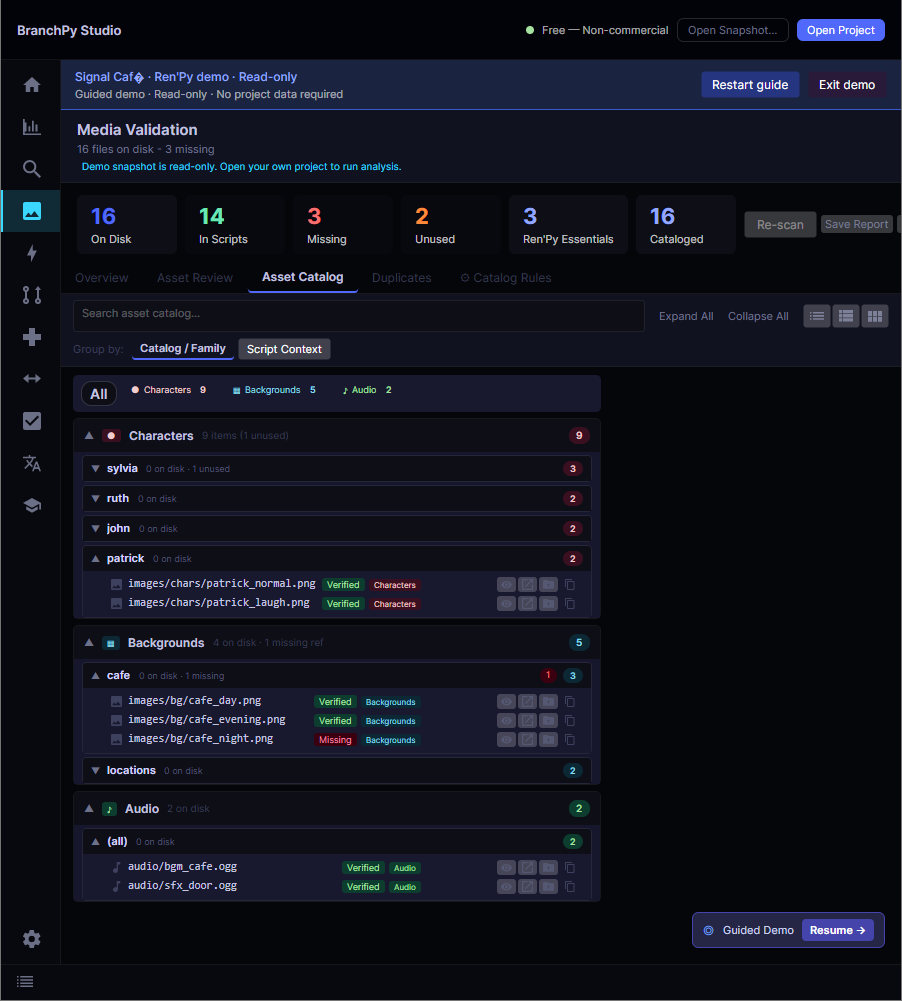
The Media screen in BranchPy Studio — every asset classified, with missing and unreferenced files surfaced for review.
The Ren'Py asset problem other tools get wrong
Most scanners flag every file that isn't explicitly referenced in a script as "unused." In Ren'Py that's dangerous: your game/gui/ folder holds dozens of images the engine needs at runtime, and none of them appear in script.rpy. Treating them as deletable silently breaks your game.
BranchPy Studio classifies files before showing them to you. Engine-managed paths are marked Protected and kept out of any action set. Nothing is deleted or modified for you — BranchPy validates, highlights, and reports, and every decision stays in your hands.
What it validates
Media inventory
A complete count of every file on disk by type — image, audio, video — with a referenced vs. unreferenced breakdown.
Reference scanning
Scans image, show, scene, play, voice, and Python API calls across every .rpy file to map what's actually used.
Missing-asset detection
Files referenced in scripts but absent from disk are highlighted immediately — before they become a runtime error on some rarely-reached label.
Protected-path classification
Engine-managed paths — gui/, renpy/, common/, launcher/, fonts/ — are classified and kept out of any selectable action.
Review tiers & confidence
Unreferenced files are grouped into Cleanup Candidate, Needs Review, and Dynamic Risk tiers with a deterministic confidence score and a reason per file.
Teach BranchPy your project
Define how your project loads media at runtime with project rules stored in .branchpy.toml. A live preview shows match counts and precedence before any rule is saved.
Scan, classify, review
A read-only pipeline that gives you an honest picture without ever touching your files.
Scan
BranchPy inventories every media file and scans all .rpy references to see what's actually used.
Classify
Each file gets one status — Used, Protected, Unreferenced, or Missing — with a reason you can inspect.
Review
Unreferenced files are tiered by confidence and surfaced for review. You decide what to do — nothing is removed for you.
Four statuses, one honest picture
Every file in your project gets exactly one classification.
| Status | What it means |
|---|---|
| Used | Referenced in at least one .rpy file via image, show, play, or similar, and present on disk. |
| Protected | Lives in an engine-managed path (gui/, renpy/, common/, launcher/, fonts/). Never offered for any action. |
| Unreferenced | Not detected in this scan. May still be loaded dynamically — shown for review, with a reason, not for automated cleanup. |
| Missing | Referenced by a script but absent from disk — a runtime error waiting to happen, highlighted immediately. |