
Detect logic bugs before your players do
BranchPy Studio analyzes your entire Ren'Py project — resolving every label, jump, call, and menu branch — to detect broken transitions, undefined targets, and variable issues. Every finding is mapped to the exact line, with no playthrough required.
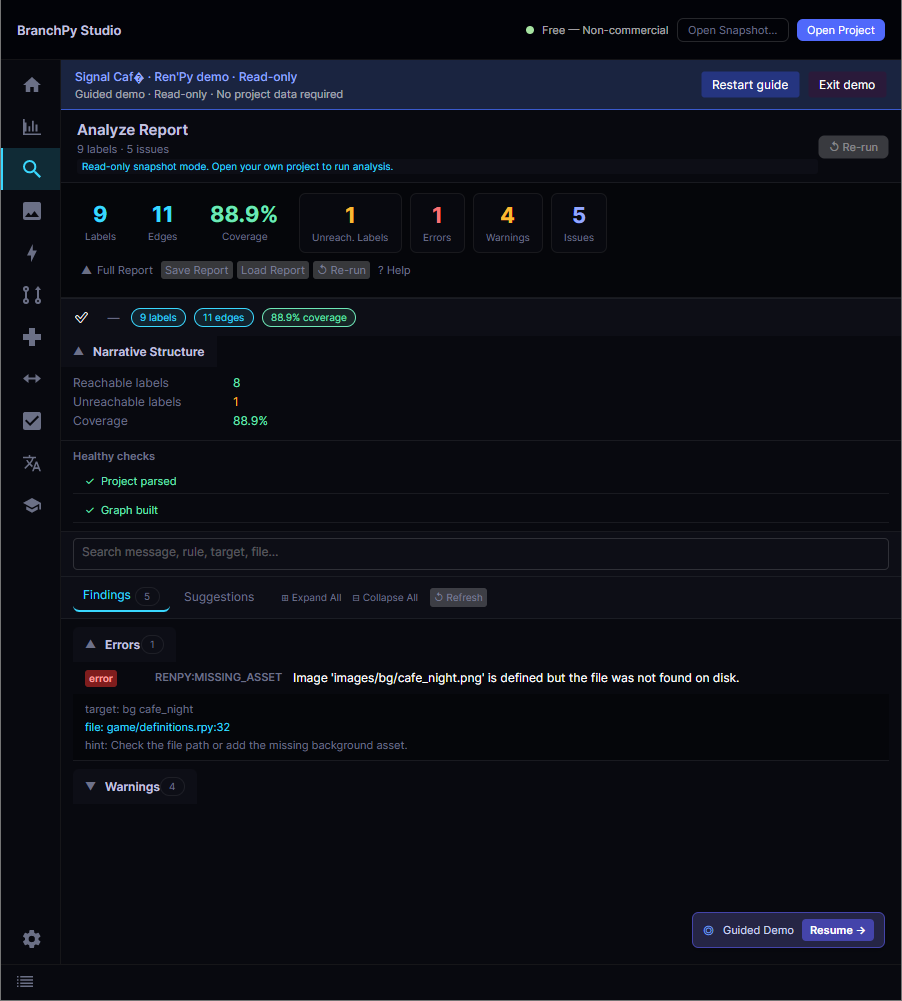
The Analyze screen in BranchPy Studio — findings grouped by severity, each linked to its source line.
Ren'Py runs your script — it doesn't check it first
Ren'Py parses and executes your scripts at runtime. A jump broken_label buried in a rarely-taken branch isn't caught until a player actually reaches it — sometimes months after release, reported as a crash in a review.
BranchPy Studio performs deterministic static analysis across your whole project before you run anything. It resolves every label reference, tracks variable assignments through all branches, and highlights issues at the line they occur — so you fix the cause instead of guessing which playthrough triggered it. Analysis is read-only: your source is never modified.
What it detects
Undefined jump & call targets
A jump or call references a label that doesn't exist anywhere in the project — flagged as an error before it crashes at runtime.
Variable read before assignment
A variable is accessed on a branch where it was never assigned — the kind of NameError that only surfaces on one specific path.
Unreachable labels
Defined labels that no jump, call, or menu option can reach — often cut content, a renamed label, or a structural bug.
Call without return
A call target has no return statement, so execution continues past the called block in ways you didn't intend.
Duplicate branch paths
Two menu choices that navigate to the same label — usually a copy-paste oversight that quietly erodes meaningful choice.
Reading-time outliers
Labels much longer or shorter than your project average — a quick signal for pacing review and QA prioritisation.
Complementary passes, one analysis
Open your project, run analysis, and review actionable results — each pass adds depth without changing your files.
Doctor
Checks your environment — engine path, Python version, config — and reports setup problems before analysis starts.
Analyze
The base pass: builds the label graph, resolves every jump and call, tracks variables, and measures reading time.
Pilot
Walks every reachable path to surface per-branch variable warnings and unreachable conditions.
Review
Findings are grouped by severity and file, each linked to its exact line. Results also feed Flowchart and Compare.
How findings are reported
Every finding is sorted by severity so you can triage the dangerous ones first.
| Severity | Meaning | Examples |
|---|---|---|
| Error | Will crash at runtime when the path is reached. | Undefined jump/call target; variable read before assignment. |
| Warning | Likely a bug or leftover — worth resolving before release. | Unreachable label; call without a return. |
| Info | A signal worth a look — not necessarily wrong. | Duplicate branch paths; reading-time outliers. |