
Excusez-nous — cette page est actuellement disponible en anglais uniquement.
La traduction française n'est pas encore prête. Le contenu ci-dessous est la version anglaise la plus récente.
Track translation coverage across Ren’Py tl/ directories and run a full XLSX round-trip workflow: export untranslated strings, translate them externally, validate, and apply back to your project. If you’re starting from scratch, the Bootstrap Wizard creates your starter structure in three clicks.
What Localization Coverage answers
- What percent of each locale’s strings are translated right now?
- Which strings are missing, stale, or orphaned?
- Are there placeholder mismatches or drift issues to review before applying a batch?
- Did a translation batch improve coverage, and by how much?
Typical workflows
- Starting from zero: Open the panel → Create localization starter wizard → Export XLSX → Translate → Import & Validate → Apply.
- Coverage check only: Run
bpy l10n auditto get current numbers — nothing is written. - Full round-trip: Audit → Export → Translate (spreadsheet or translator) → Import & Validate → Review Preview Panel → Apply → Re-audit.
- Safe validation pass: Run
bpy l10n import <file> --validate-onlyto inspect a workbook without touching any project files.
How to run (VS Code)
First time — bootstrap wizard
- Open the Localization Coverage panel (Control Center → Localization → Run Localization Audit, or command palette
BranchPy: L10n Coverage). - If no translation files exist, click Create localization starter.
- Step 1 — choose your source language (the language the script is written in).
- Step 2 — pick one or more target languages.
- Step 3 — review the folders that will be created, then click Create files.
- BranchPy creates
game/tl/<code>/strings.rpystarters and records configuration in.branchpy/rules.json. - Click Export XLSX to get started — the workbook opens with all source strings ready to translate.
Ongoing — import & validate
- Open the Control Center and scroll to the Localization section.
- In the panel action bar, click Import translations (or use Control Center → Import & Validate).
- Pick your translated XLSX workbook — validation runs automatically.
- Review the Import Preview Panel: check warnings, rejected rows, coverage deltas.
- Click Apply.
Managing languages
- Add language: Click + Add language in the panel action bar — jumps straight to the target language picker.
- Remove language: Click ✕ Remove next to any language row — a modal asks for confirmation and offers to back up
.rpyfiles before deletion. - Restore from backup: Click Restore from backup — pick a previous backup by language and timestamp. Backups are created automatically on removal.
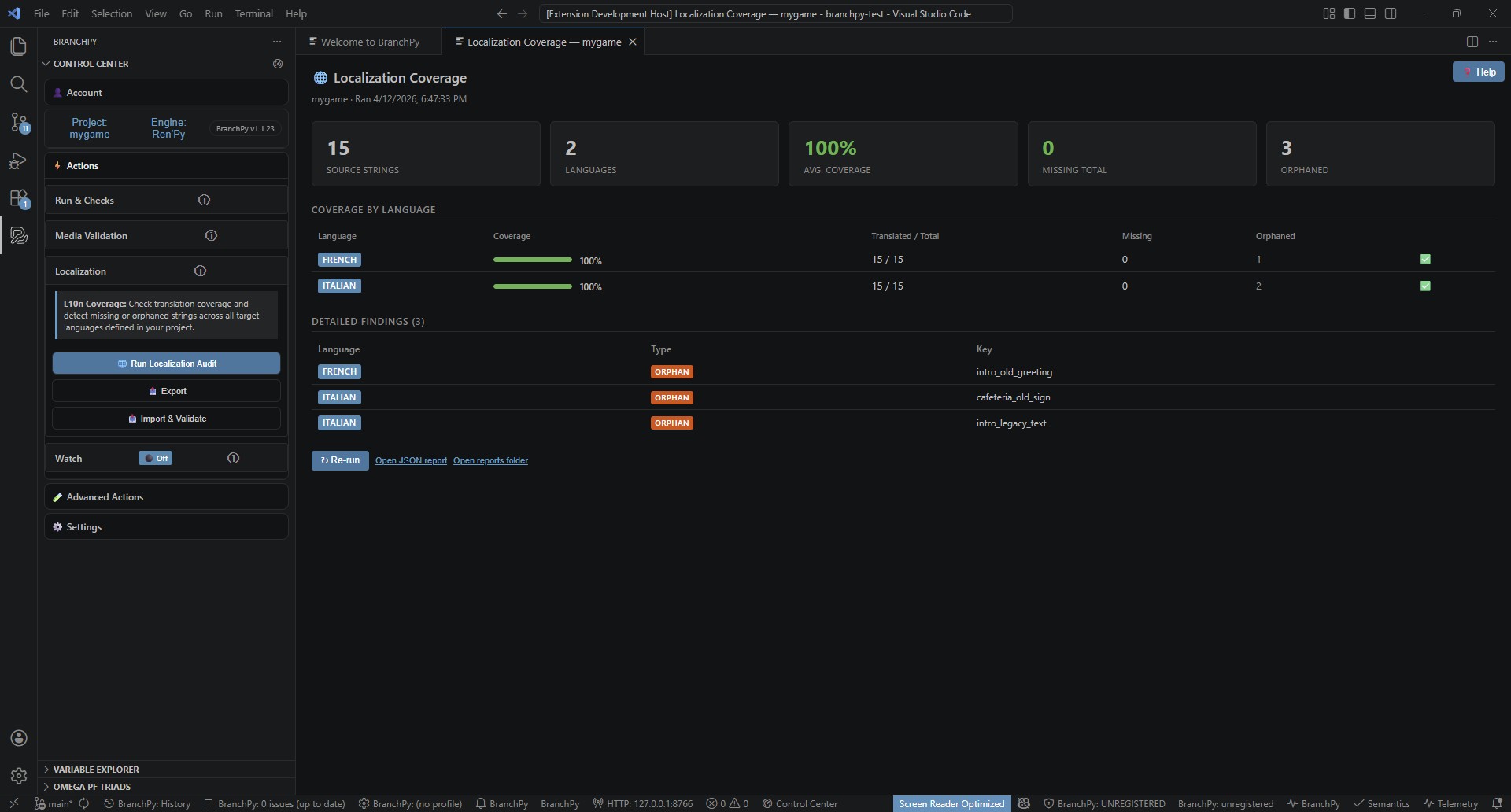
Run via CLI
Coverage audit
bpy l10n audit --project path/to/gameSample output:
Locale Coverage Report
──────────────────────────────────────────────────
  french         112 / 148  (75.7%)  ██████████████░░░░░░
  italian         67 / 148  (45.3%)  █████████░░░░░░░░░░░
  spanish-latin    0 / 148   ( 0.0%)  ░░░░░░░░░░░░░░░░░░░░
──────────────────────────────────────────────────
Run `bpy l10n trend` for history.
Add --format json --output report.json to write a machine-readable report for CI.
Export to XLSX
bpy l10n export --project path/to/game --output translations.xlsx --json-summaryExport a single locale or filter by status:
bpy l10n export --project path/to/game --locale fr --status missing --output fr_missing.xlsx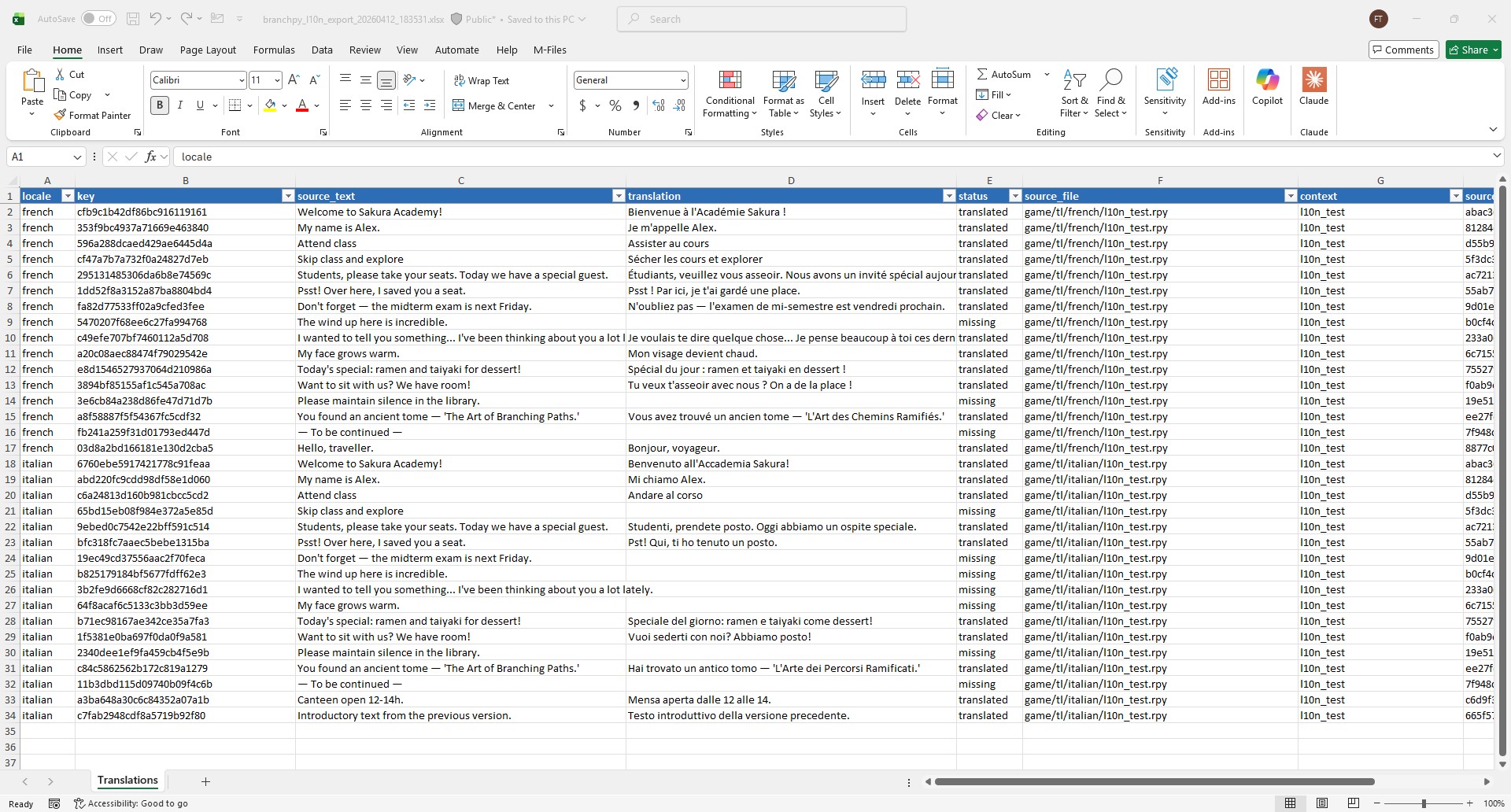
Validate a workbook (no writes)
bpy l10n import translations.xlsx --project path/to/game --validate-only --json-summaryExit code 0 = clean, 1 = has rejections, 10 = error. Safe to run in CI or before handing off to a reviewer.
Apply translations
bpy l10n import translations.xlsx --project path/to/game --apply --json-summaryPreview what would be written without touching files:
bpy l10n import translations.xlsx --project path/to/game --apply --dry-runSample --json-summary output after apply:
{
  "applied": 58,
  "skipped": 3,
  "locale_coverage_delta": {
    "french":  [75.7, 92.1],
    "italian": [45.3, 61.2]
  }
}
The XLSX workbook
| Column | Editable? | Purpose |
|---|---|---|
locale |
No | Locale identifier (fr, italian, …) |
key |
No | Round-trip anchor — do not edit |
source_text |
No | Source string at export time |
translation |
Yes | Fill in the translated string here |
status |
No | missing / translated / orphaned |
source_file |
No | Relative .rpy path |
context |
No | Label or screen name, if resolvable |
source_hash |
No | Drift-detection hash — do not edit |
notes |
Yes | Free-text translator notes (not written to project) |
Example rows:
| locale | key | source_text | translation | status |
|---|---|---|---|---|
fr |
monika_intro_00 |
Hi there! | Salut ! | missing |
it |
monika_intro_00 |
Hi there! | (fill in) | missing |
fr |
monika_intro_01 |
Did you miss me? | Tu m’as manqué ? | translated |
For multi-locale workbooks, filter the locale column in Excel to work on one language at a time. The notes column is not preserved across exports — archive the XLSX to retain notes between sessions.
Import validation codes
| Code | Outcome | When it triggers |
|---|---|---|
MALFORMED_ROW |
Rejection | key or locale is empty |
INVALID_LOCALE |
Rejection | locale is not a recognised identifier |
PLACEHOLDER_MISMATCH |
Rejection | Translation is missing source placeholders |
DUPLICATE_KEY |
Rejection | Same (locale, key) appears more than once |
UNKNOWN_LOCALE |
Skip | Locale not present in project tl/ dirs |
UNKNOWN_KEY |
Skip | (locale, key) does not exist in project index |
SOURCE_DRIFT |
Warning | source_hash no longer matches current project |
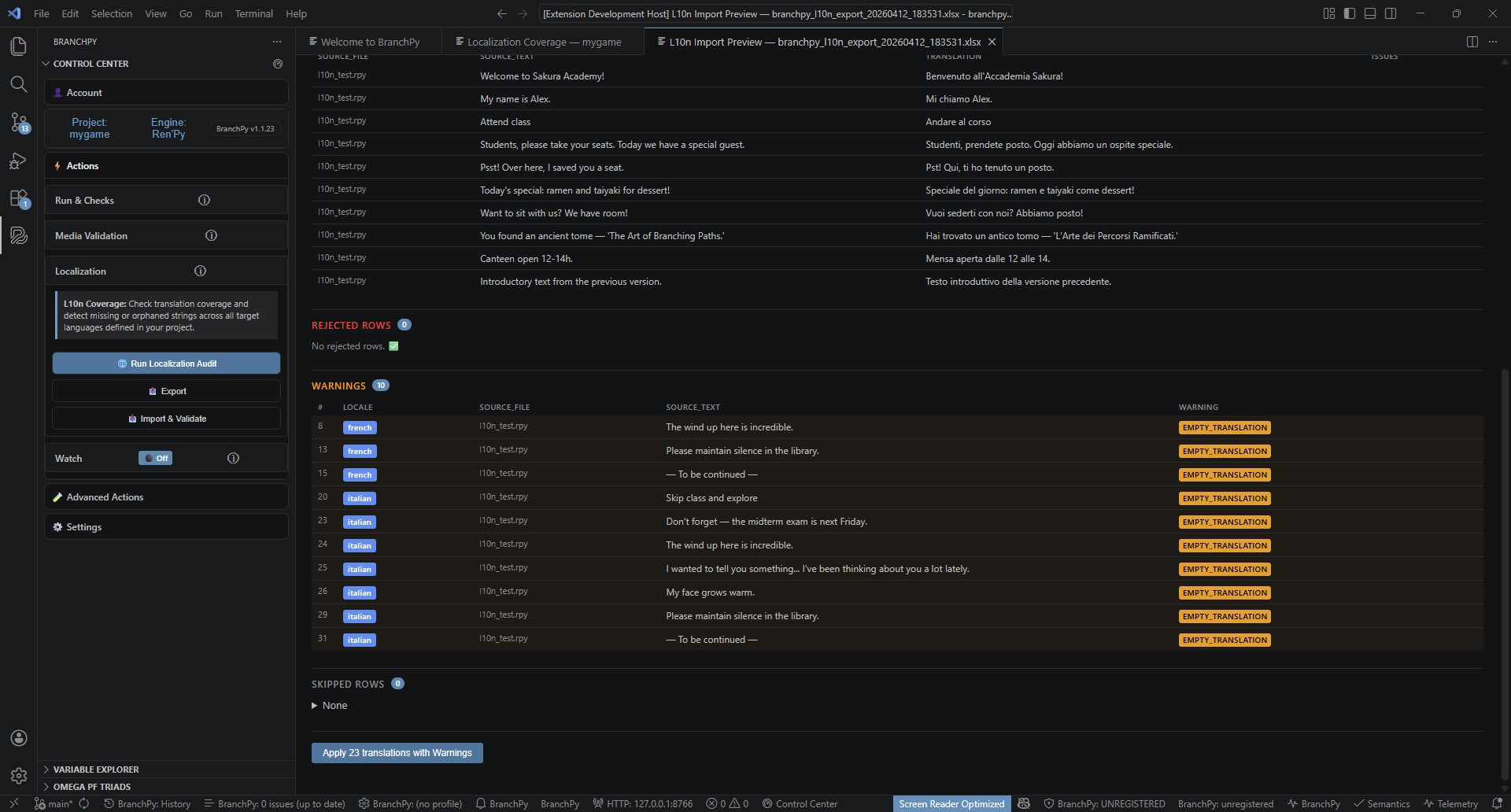
EMPTY_TRANSLATION |
Warning | Translation cell is empty for a missing-status row |
Rejection rows are always blocked from apply. Skip rows are silently omitted (stale export or new locale). Warning rows proceed to apply but may need translator review.
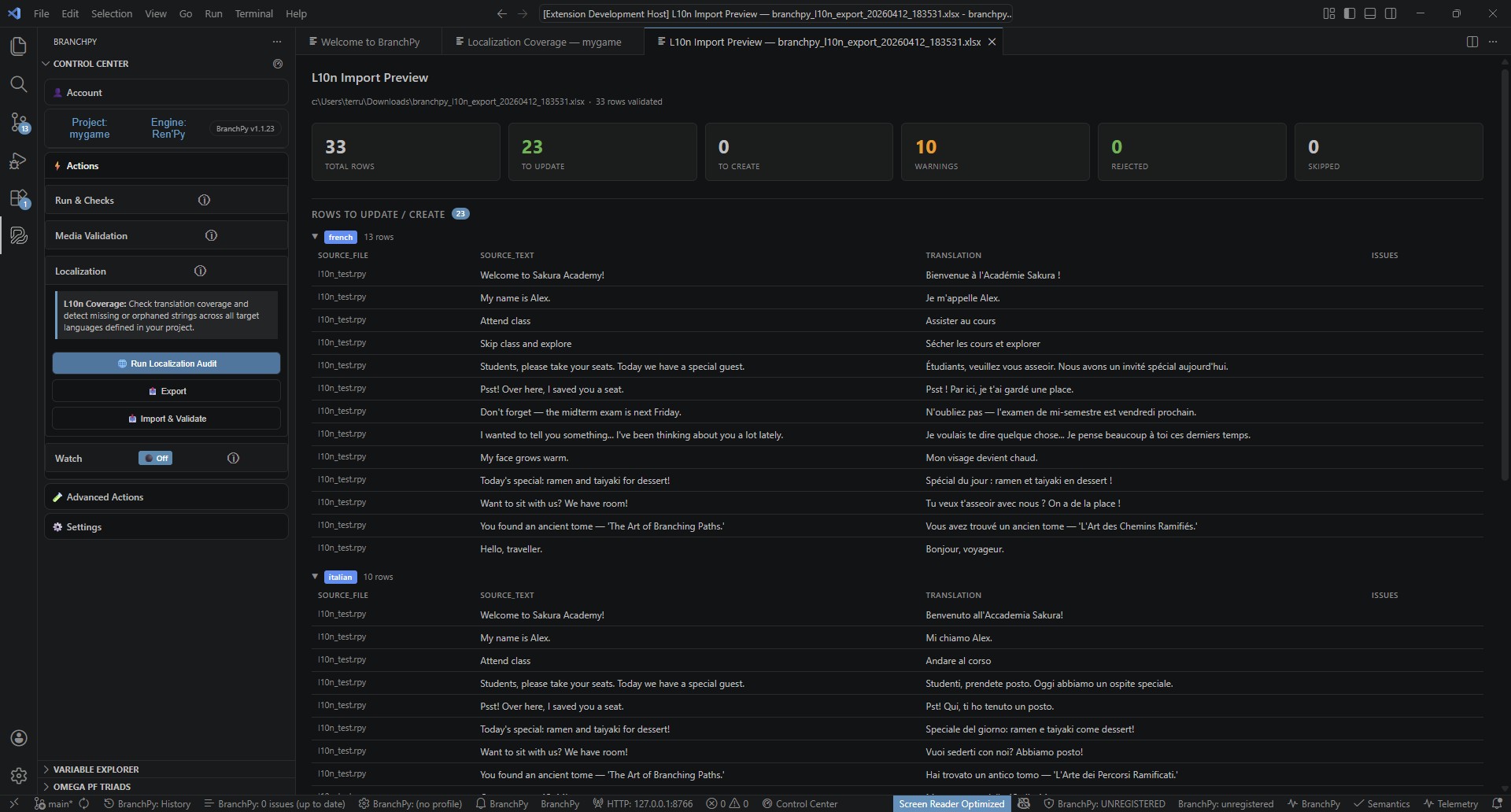
The Import Preview Panel
After Import translations completes, the panel shows:
- Summary bar — 6 count cards: total rows, to update, to create, warnings, rejected, skipped.
- Rows to Update / Create — collapsible by locale; shows source text, translation, and warning badges.
- Rejected Rows — red-highlighted; rejection code with full detail on hover.
- Warnings — amber-highlighted rows; warning code shown inline.
- Apply button — disabled with a 🔒 label when any rejected rows exist; a confirmation modal appears if warnings are present.
After a successful apply, a toast shows per-locale coverage deltas:
✅ L10n apply complete | French: 75% → 92% | Italian: 45% → 61% | View Report
Backups
BranchPy creates backups in two scenarios:
- Remove language (Back Up & Remove): copies
game/tl/<lang>/to.branchpy/l10n/backups/<timestamp>/<lang>/before deleting. - Apply translations: copies all
.rpyfiles it will modify to.branchpy/l10n/backups/apply_<YYYYMMDD_HHMMSS>/before writing.
Backups contain raw .rpy files — not XLSX. To restore one, use Restore from backup in the panel action bar.
Backup vs. XLSX import: a backup is a folder of
.rpyfiles restored directly togame/tl/<lang>/— no validation or preview. An XLSX import goes through the full CLI pipeline (validate, preview, apply). They are different operations.
Apply rules
- Backup first: every apply creates
.branchpy/l10n/backups/apply_<YYYYMMDD_HHMMSS>/before writing. - Atomic per file: writes to each
.rpyfile are accumulated in memory, then committed atomically via write-to-temp + replace. - SOURCE_DRIFT rows: auto-skipped in CI / VS Code; use
--accept-driftor--skip-driftto override. - Dry-run:
--dry-runruns the full apply logic and reports what would change without writing any files.
When to re-run audit
- After applying a translation batch to confirm new coverage numbers.
- Before a release to set a baseline in version control.
- In CI via
bpy l10n audit --format json --output l10n_report.jsonafter each merge.
Learn more: Localization feature overview
Run via CLI
Coverage audit
bpy l10n audit --project path/to/gameSample output:
Locale Coverage Report
──────────────────────────────────────────────────
  french         112 / 148  (75.7%)  ██████████████░░░░░░
  italian         67 / 148  (45.3%)  █████████░░░░░░░░░░░
  spanish-latin    0 / 148   ( 0.0%)  ░░░░░░░░░░░░░░░░░░░░
──────────────────────────────────────────────────
Run `bpy l10n trend` for history.
Add --format json --output report.json to write a machine-readable report for CI.
Export to XLSX
bpy l10n export --project path/to/game --output translations.xlsx --json-summaryExport a single locale or filter by status:
bpy l10n export --project path/to/game --locale fr --status missing --output fr_missing.xlsx
Validate a workbook (no writes)
bpy l10n import translations.xlsx --project path/to/game --validate-only --json-summaryExit code 0 = clean, 1 = has rejections, 10 = error. Safe to run in CI or before handing off to a reviewer.
Apply translations
bpy l10n import translations.xlsx --project path/to/game --apply --json-summaryPreview what would be written without touching files:
bpy l10n import translations.xlsx --project path/to/game --apply --dry-runSample --json-summary output after apply:
{
  "applied": 58,
  "skipped": 3,
  "locale_coverage_delta": {
    "french":  [75.7, 92.1],
    "italian": [45.3, 61.2]
  }
}
The XLSX workbook
| Column | Editable? | Purpose |
|---|---|---|
locale |
No | Locale identifier (fr, italian, …) |
key |
No | Round-trip anchor — do not edit |
source_text |
No | Source string at export time |
translation |
Yes | Fill in the translated string here |
status |
No | missing / translated / orphaned |
source_file |
No | Relative .rpy path |
context |
No | Label or screen name, if resolvable |
source_hash |
No | Drift-detection hash — do not edit |
notes |
Yes | Free-text translator notes (not written to project) |
For multi-locale workbooks, filter the locale column in Excel to work on one language at a time. The notes column is not preserved across exports — archive the XLSX to retain notes between sessions.
Import validation codes
| Code | Outcome | When it triggers |
|---|---|---|
MALFORMED_ROW |
Rejection | key or locale is empty |
INVALID_LOCALE |
Rejection | locale is not a recognised identifier |
PLACEHOLDER_MISMATCH |
Rejection | Translation is missing source placeholders |
DUPLICATE_KEY |
Rejection | Same (locale, key) appears more than once |
UNKNOWN_LOCALE |
Skip | Locale not present in project tl/ dirs |
UNKNOWN_KEY |
Skip | (locale, key) does not exist in project index |
SOURCE_DRIFT |
Warning | source_hash no longer matches current project |
EMPTY_TRANSLATION |
Warning | Translation cell is empty for a missing-status row |
Rejection rows are always blocked from apply. Skip rows are silently omitted (stale export or new locale). Warning rows proceed to apply but may need translator review.
The Import Preview Panel
After Import & Validate completes, the panel shows:
- Summary bar — 6 count cards: total rows, to update, to create, warnings, rejected, skipped.
- Rows to Update / Create — collapsible by locale; shows source text, translation, and warning badges.
- Rejected Rows — red-highlighted; rejection code with full detail on hover.
- Warnings — amber-highlighted rows; warning code shown inline.
- Apply button — disabled with a 🔒 label when any rejected rows exist; a confirmation modal appears if warnings are present.
After a successful apply, a toast shows per-locale coverage deltas:
✅ L10n apply complete | French: 75% → 92% | Italian: 45% → 61% | View Report
Apply rules
- Backup first: every apply creates
.branchpy/l10n/backups/apply_<YYYYMMDD_HHMMSS>/before writing. - Atomic per file: writes to each
.rpyfile are accumulated in memory, then committed atomically via write-to-temp + replace. - SOURCE_DRIFT rows: auto-skipped in CI / VS Code; use
--accept-driftor--skip-driftto override. - Dry-run:
--dry-runruns the full apply logic and reports what would change without writing any files.
When to re-run audit
- After applying a translation batch to confirm new coverage numbers.
- Before a release to set a baseline in version control.
- In CI via
bpy l10n audit --format json --output l10n_report.jsonafter each merge.
Learn more: Localization feature overview